Work From Home Jumpstart
How to Build a Professional Remote Workspace for Less
The $500 Home Office Jumpstart
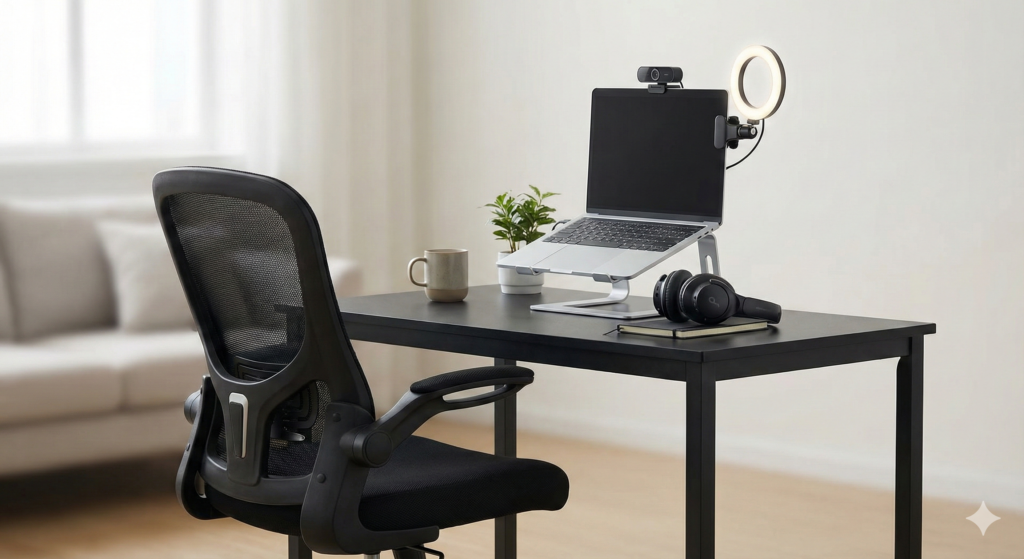
So, you’ve decided to make the leap to remote work. Maybe you just landed a new work-from-home job, or perhaps you’re finally launching that freelance business. Congratulations
Now comes the reality check.
You sit down at your kitchen table, open your laptop, and within two hours, your back hurts. Your webcam makes you look like a grainy shadow. You realize you have nowhere to put your coffee without knocking it over.
You need a workspace, but you have a problem: Office gear is expensive.
If you look at “Dream Desk” setups on Instagram, you’ll see $1,500 ergonomic chairs and $2,000 solid walnut desks. It’s enough to make you want to give up and go back to the cubicle.
Here is the good news: You do not need to spend a fortune to look professional and feel comfortable. You don’t need fancy; you need functional.
I created this guide—The Home Office Jumpstart—to prove it. I have scoured the market to build a complete, ergonomic, Zoom-ready workspace for under $500 total.
II. The Foundation: Desk & Chair (Budget: ~$180)
Your back is your most important business asset. Do not skimp here. We aren’t buying luxury, but we are buying ergonomics.
1. The Chair: Hbada Office Task Chair
Why this one: This is widely considered the king of budget ergonomic chairs. It features a breathable mesh back (so you don’t get sweaty) and a flip-up armrest design that lets you push the chair fully under your desk to save space.
- Best Feature: Flip-up arms for small spaces.
- Comfort Level: High lumbar support.
2. The Desk: Sweetcrispy Computer Desk (40 Inch)
Why this one: It’s incredibly cheap, but sturdy enough for a laptop and a monitor. It has a minimalist design and includes a side storage bag for your notebooks.
- Assembly: Very fast (under 20 mins).
- Bonus: Includes a headphone hook.
III. The AV Club: Look & Sound Pro (Budget: ~$10)
Nothing screams “amateur” like bad audio and grainy video. These two tools will make you look like a CEO.
3. The Webcam: Anker PowerConf C200 2K.
Stop using your laptop’s built-in camera. This Anker webcam offers 2K resolution and excellent low-light performance. Crucially, it has a built-in privacy cover.
4. The Audio: Anker Soundcore Life Q20
You need Active Noise Cancelling (ANC) to block out household noise. These headphones offer incredible ANC for a fraction of the price of Sony or Bose.
IV. The Essentials: Ergonomics & Lighting (Budget: ~$40)
5. iVoler Laptop Stand
Pro Tip: Looking down at your laptop causes neck strain (“Tech Neck”). Use this simple aluminum stand to raise your screen to eye level.
Note: You will need an external keyboard/mouse if you use this!
6. Clip-On Ring Light
Good lighting is the difference between looking tired and looking energetic. This small light clips right onto your monitor.
V. The Final Tally
Let’s do the math on your new setup:
- Chair:~$120
- Desk:~$60
- Webcam: ~$50
- Headset: ~$50
- Stand + Light: ~$40
GRAND TOTAL: ~$320
We came in well under the $500 budget! This leaves you room for the optional upgrade below.
VI. Optional Upgrade: The Productivity Booster
Since we saved money, here is the #1 upgrade I recommend:
Sceptre 24-Inch 1080p Monitor
Working on a second screen makes you 50% faster. This monitor is reliable, crisp, and fits perfectly into our remaining budget.
VII. Ready to Start?
Don’t overthink it. You can spend weeks researching, or you can order this kit, set it up this weekend, and start your remote career on the right foot.
Work From Home Jump Start. All Rights Reserved ©2026